How to Organize Cables and Chargers Neatly
Cables and chargers are useful every day, but they can quickly turn into a tangled mess. Phone cords collect beside the bed, computer cables gather under the desk, and spare chargers disappear into drawers. With a simple system, you can keep everything easy to find, protected from damage, and ready to use.
The key is to sort your cables, remove items you no longer need, and give each type a specific place. You do not need expensive equipment or a complete room makeover. A few organizers, labels, and regular habits can make a noticeable difference.
Start With a Complete Cable Review
Before buying organizers, gather all your cables and chargers in one place. Check drawers, bags, desks, bedside tables, and storage boxes. Seeing everything together makes it easier to understand what you own and what you actually use.
Create a few basic groups:
– Phone and tablet charging cables
– Laptop and computer chargers
– Audio and video cables
– Power strips and extension cords
– Camera and gaming cables
– Spare or rarely used cables
– Cables that are damaged or unidentified
Test items when possible. If a cable is frayed, bent near the connector, or no longer works reliably, set it aside for proper recycling or disposal. Avoid keeping cables simply because they might be useful someday if you already have several similar replacements.
Match Chargers With Their Devices
Chargers are easier to manage when they stay with the devices they serve. For example, keep a laptop charger near the laptop storage area, a tablet cable near the living room charging spot, and a camera charger with the camera accessories.
If one charger works with several devices, label it clearly and store it in a shared charging kit. This prevents confusion and reduces the chance of taking the wrong cable when traveling.
A useful approach is to create these categories:
Daily Use
Keep the cables you use every day within easy reach. These may include your phone charger, work laptop charger, and wireless headphones cable.
Occasional Use
Store cables for cameras, controllers, external drives, and other devices in a nearby drawer or box.
Travel Use
Create a small travel pouch with one or two common charging cables, a compact power adapter, and any necessary connectors. Keeping this kit packed makes it easier to leave without searching through the house.
Choose the Right Storage Method
Different cables need different storage solutions. The best method depends on how often you use each item and how much space you have.
Cable Clips
Cable clips are useful for cords that stay on a desk or nightstand. Attach them near the edge of the surface to keep charging connectors from falling behind furniture. Use one clip for each frequently used cable.
Cable Ties
Reusable hook and loop ties are a simple choice for coiling cables. They are adjustable, gentle on cords, and available in different sizes. Avoid tying cables too tightly, as sharp bends can damage the internal wires.
Small Boxes or Bins
Use small boxes to separate cable types. One container might hold phone cables, another might store computer accessories, and a third could contain audio or video cables.
Clear containers make it easier to see what is inside. If you prefer opaque boxes, add a label to the front.
Drawer Dividers
Drawer dividers prevent cables from spreading into one large pile. Assign each section to a category, such as charging cords, adapters, memory cards, or headphones.
Cable Bags
A zippered cable bag works well for travel or for people who frequently move between rooms. Look for one with elastic loops or small compartments so each item stays in place.
Coil Cables Without Damaging Them
The way you coil a cable affects how long it lasts. Start by straightening the cable and removing twists. Coil it in a loose circle, keeping the connector ends facing outward. Secure the center with a reusable tie.
For longer cords, try the over under method. Make one loop in the natural direction of the cable, then make the next loop in the opposite direction. Continue alternating until the cord is fully coiled. This technique helps reduce twists and kinks.
Do not wrap a cable tightly around a charger block. Instead, coil the cable separately and place it beside the adapter. This reduces stress where the cable meets the connector or charging block.
Label Both Ends of Important Cables
Labels save time when several cables look alike. Label both ends of cables that connect equipment, especially those behind a desk or entertainment center.
You can use:
– Small adhesive labels
– Colored electrical tape
– Reusable cable tags
– Heat shrink labels for long term setups
– Different colored ties for different categories
Keep labels short and clear. Examples include “Monitor,” “Printer,” “Tablet,” or “Travel.” For a cable that connects two devices, labeling both ends can help you identify it without pulling equipment away from the wall.
Improve Your Desk and Charging Area
A tidy charging station can prevent clutter from spreading throughout the room. Choose one location for everyday charging and keep only the necessary cables there.
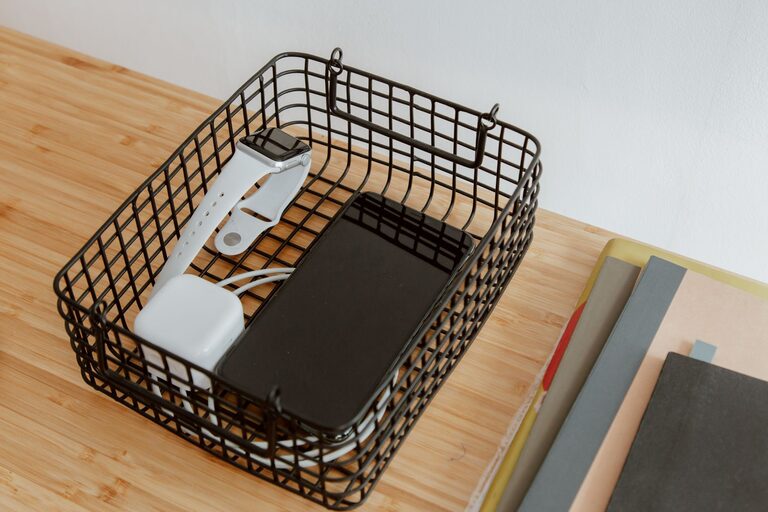
Consider using a small tray, shelf, or box to hold chargers. A cable management box can hide excess cord length and power strips, while adhesive clips can guide cables along the back or underside of a desk.
Leave enough slack for comfortable use, but avoid letting long sections rest across walkways or hang loosely from furniture. Arrange cables so they do not cross areas where they can be pulled, stepped on, or caught.
Store Cables for Long Term Use
Cables that are not used often should be clean, dry, and protected from pressure. Coil them loosely and place them in a labeled container. Keep small adapters in a separate pouch so they do not get lost among larger cords.
Avoid storing cables in very hot, damp, or cramped spaces. Do not place heavy objects on top of them, and keep connectors covered when possible to reduce dust buildup.
For extra organization, make a simple inventory list. Write down the cable type, its purpose, and where it is stored. This is especially helpful if your household has several similar chargers.
Build a Simple Maintenance Habit
Cable organization works best when it becomes part of your routine. Once a month, take a few minutes to return loose cables to their assigned places. Remove duplicates that you no longer need and check frequently used cords for signs of wear.
When you buy a new device, decide immediately where its charger will live. If an old cable is replaced, update your storage system instead of adding the new one to an already crowded drawer.
A neat cable setup is not about making every cord invisible. It is about creating a system that makes cables easy to identify, reach, and put away. With clear categories, suitable storage, and a few regular habits, your chargers and cables can stay organized for the long term.